
Tutoring Services
Meet your academic goals with the help of Tutoring Services. Our team provides 1-on-1 tutoring, drop-in tutoring, and group tutoring as well as the S2I and TLC+ programs for specific courses.
Tutoring support is 100% free and available to all enrolled WSU students.
Tutors provide skills and tools to help you to become an independent learner. They will guide you and explain concepts, so you can gain the skills to complete your assignments on your own.
A tutor will not complete your assignments or projects for you. They cannot help you take an exam or quiz, since these tests are given to measure what you know. The only exception is if you show the tutor a written statement from your professor that clearly states it’s allowed.
Our tutors are your peers—they are other WSU students who have:
- completed 32+ credits
- an overall GPA of 3.0 or higher
- earned a grade of an A or B in the courses they tutor for
- been recommended by a faculty member
WSU tutors follow the Tutor Code of Ethics developed by the National Tutoring Association.
Students who are low-income, first-generation college students, or have a disability may be eligible for additional tutoring and other support through TRIO Student Support Services.
Students in the S2I program improve, on average, by nearly a letter grade (.71 on a 4.0 scale).
Students who use Tutoring Services have 3.1 average GPA (on a 4.0 scale).
Tutoring Services employs as many tutors as possible to cover a variety of subjects and available hours.
Tutoring Services supports almost ¼ of WSU students every year.
WSU peer tutors are excited to work with you, whether you’d like to meet in person or online.
You can make an appointment or drop in for tutoring at Library 220 on the Winona campus.
Students in Rochester can meet with tutors in person at the RCTC Learning Center.
Connect with a Peer Tutor
For the most complete and current scheduling information, browse the TracCloud calendar.
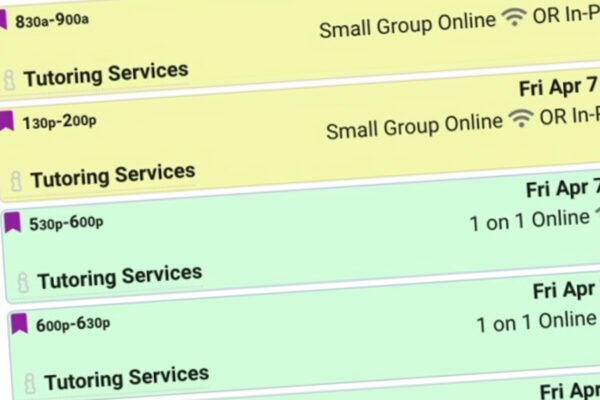
Hours for tutoring vary on the tutors’ schedules, and most sessions are held in the afternoon and evening. Individual appointments are available during a wide range of days and times. You’ll see drop-in sessions (blue), 1-on-1 sessions (green), and small group sessions (yellow) listed in the TracCloud calendar.
Most tutoring is provided in the Library 220, but some tutors work out of other campus buildings too. Writing Center tutoring is held in Minne 348.
The exact location is noted in TracCloud calendar for every appointment and drop-in session.
How to Prepare for a Tutoring Session
Appointments are 30 minutes or 60 minutes. Bring any relevant materials such as textbooks, worksheets, notes, handouts, or other supplies you may need.
Be as clear as you can about the specific questions or problem areas to focus on. This will help the tutor focus on your main concerns and avoid spending time on issues that are not a concern for you.
All WSU students get 15 free hours of this service each year.
To access your hours, log into D2L and find the Tutor.com information on the right-hand side.
D2L Brightspace
WSU-Rochester undergraduate students are encouraged to use the tutors at the RCTC Learning Center.
You can get free tutoring support with:

WSU Tutoring Services offers group tutoring session for some nursing courses and details will be shared in class.
Tutoring Services offers organized group study sessions for certain courses each semester, typically in the late afternoons or evenings.
In both the S2I and TLC+ programs, you’ll experience active group learning in a comfortable environment where it’s safe to make the mistakes that are a natural part of learning.
If you’re in an S2I or TLC+ supported class, complete the S2I and TLC+ scheduling survey to help determine the schedule for next semester.
Spring 2024 S2I Classes
| Class | Professor | S2I Leader(s) | Session Days & Times | Location |
|---|---|---|---|---|
| BIOL 117 | Larson | Willa Carmen | Sundays 6pm, Wednesdays 7pm | PA 237 |
| BIOL 211 | Wilson | Abi Knoernschild and Charlotte Peyer | Mondays and Wednesdays 5pm | PA 133 |
| BIOL 212 | Larson | Heather Coughlin | Mondays and Wednesdays 5pm | PA 237 |
| CHEM 351 | Nalli | Alex Charles | Tuesdays and Thursdays 5pm | PA 133 |
WSU offers free, online, on-demand tutoring through Tutor.com. Tutors are available 24/7, even late at night when your instructor or face-to-face tutors may not be.
Stuck on a problem? Want someone to review your paper? Tutor.com is easy to use and can be accessed on any device that’s connected to the internet.
When you log in to Tutor.com, you can:
- Connect with more than 3,000 qualified tutors
- View replays and transcripts of previous sessions
- Drop off an essay for review and feedback
- Save your favorite tutors and see their schedules
- Access services from your laptop, phone, or tablet
Ready to get online tutoring? Access your 15 hours of free online tutoring with one of the following:
- Log in to D2L and enter one of your course sites. From the Resources drop-down, choose “Online tutoring with Tutor.com.” Be sure to choose this option if your professor has made tutoring part of an assignment, so they can access a report that tells which of their students have used online tutoring.
- Log in to D2L and find details about Tutor.com in the right-hand menu of the homepage.
Learn more in this How-To Guide for Tutor.com (PDF).
For questions, please email Tutoring Services at tutoringservices@winona.edu or Associate Director Jill Quandt at jquandt@winona.edu.
HippoCampus offers students free multimedia lessons and course materials to help with lessons, homework, and studying.
Find courses and digital content in subject areas like:
- American Government
- Biology
- Environmental Science
- Math
- Physics
- Statistics
- U.S. History
- Psychology
LinkedIn Learning offers thousands of videos to develop your technical, creative, and business skills.
Learn how to create your free account through WSU.
Quizlet is a leading study site with free, simple, web-based study tools, games, and mobile apps.
Users can create their own content or choose from study sets (over 20 million and counting) created by their classmates or teachers.
Find flashcards to study or create your own flashcards with Study Stack.
Study online flashcards or use other activities—such as matching, crosswords, hangman, scrambled word, or bug chase—that automatically use information from your own flashcards.
Study flashcards anytime and anywhere by printing your flashcards or by downloading them to your phone or computer.
Khan Academy covers more than 2,600 K-12 math and science topics such as biology, chemistry, and physics, and it even reaches into the humanities with playlists on finance and history.
Each video is approximately 10 minutes long and meant for viewing on a computer.
The West Texas A&M University Virtual Math Lab is a great resource if you need help in:
- College algebra
- Intermediate algebra
- Beginning algebra
- Math for the sciences
- Preparing for the math section of the general GRE, THEA, or ACCUPLACER tests
Being a peer tutor or S2I leader is a rewarding student employment opportunity where you’ll:
- enhance your problem-solving skills
- help students become independent learners
- gain valuable work experience while earning your degree

Minimum requirements to become a peer tutor include:
- Have a cumulative GPA of 3.0 or higher with a minimum of 32 credits completed (12 credits must have been completed at WSU)
- Earned A or B grades in courses they would like to tutor
- Enrolled in 6 or more credits each semester they tutor
- Have good communication skills
- Have the ability to work with students from diverse backgrounds and with varied skill levels
- Have a completed recommendation form from a faculty member in each subject area they would like to tutor (e.g., Accounting, Economics, Math)
Krueger Library 218
507.457.5680